Hacked Site
Recovery
Pride Ceilings and Drywall — a live site compromised by a rogue admin, 3,450 spam pages injected into Google, and a full forensic cleanup completed in under two hours.
The client had been receiving repeated emails from Google Search Console warning about pages on his site that weren’t being indexed. His site only has 4 pages — so there should have been nothing to report. When the GSC account was checked, the full picture emerged: the site had been compromised, a rogue admin user had inserted malware, and thousands of Japanese spam product pages had been injected into the site and indexed by Google under the client’s domain. The attack was actively destroying the site’s SEO and could not be resolved through the wp-admin dashboard — which had been locked out by the attacker.
From a GSC email to a full security breach
| GSC Status | Reason | Pages |
|---|---|---|
| Not Indexed | Crawled — currently not indexed (spam injection) | 3,389 |
| Not Indexed | Alternate page with proper canonical tag | 28 |
| Not Indexed | Server error (5xx) | 25 |
| Not Indexed | Not found (404) | 2 |
| Indexed | Legitimate pages + spam pages Google had already indexed | 587 |
site:prideceilingsdrywall.co.za search on Google revealed everything. Alongside the 4 legitimate business pages, the results were filled with spam product listings in Japanese — Canon laser printers, Nike trainers, and Japanese retail products — all appearing to be hosted on the client’s domain. Google had already crawled and indexed hundreds of these pages, which was actively poisoning the site’s SEO profile.
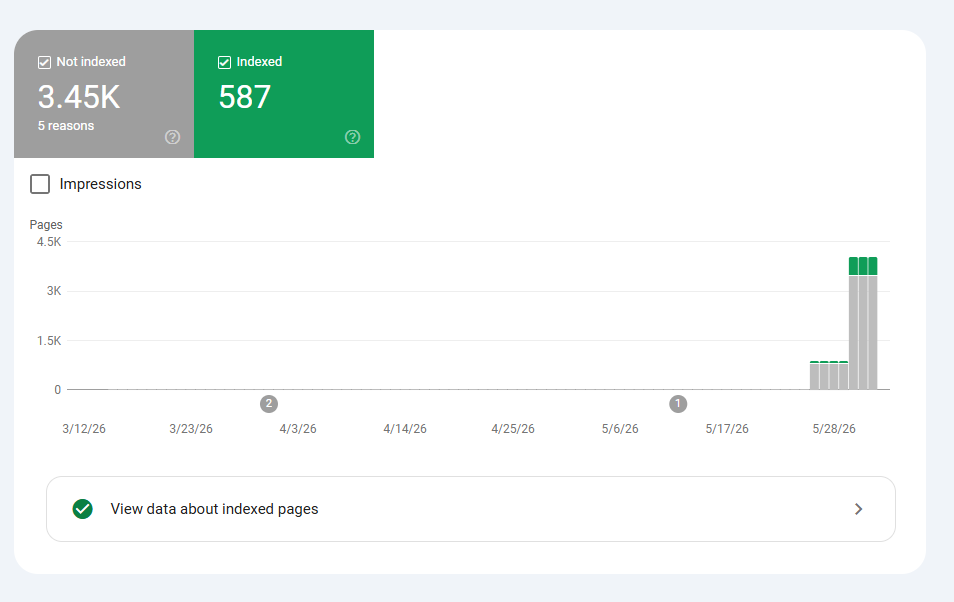
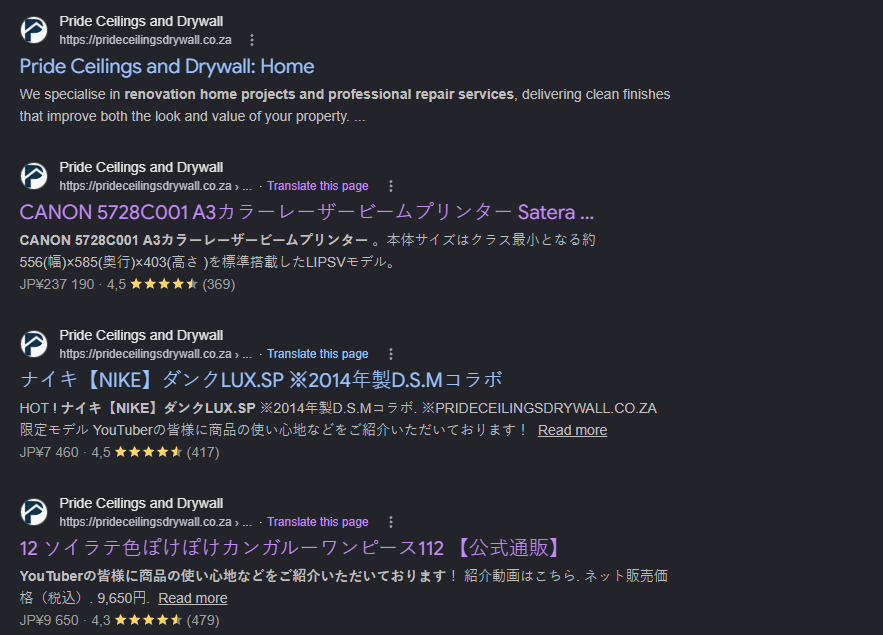
Japanese keyword spam (also called “pharma hack” or “SEO spam injection”) is a specific class of attack where malware silently creates thousands of pages targeting Japanese search queries. These pages get indexed under the victim’s domain, associating their site with spam content. Google responds by either deindexing pages or penalising the site’s overall search rankings — even the legitimate pages. Left unaddressed, this can permanently damage a domain’s reputation with Google.
Getting in and understanding the damage
wp user list via the SSH terminal revealed the full user table. The legitimate client account was present — but two additional administrator accounts had been created by the attacker:
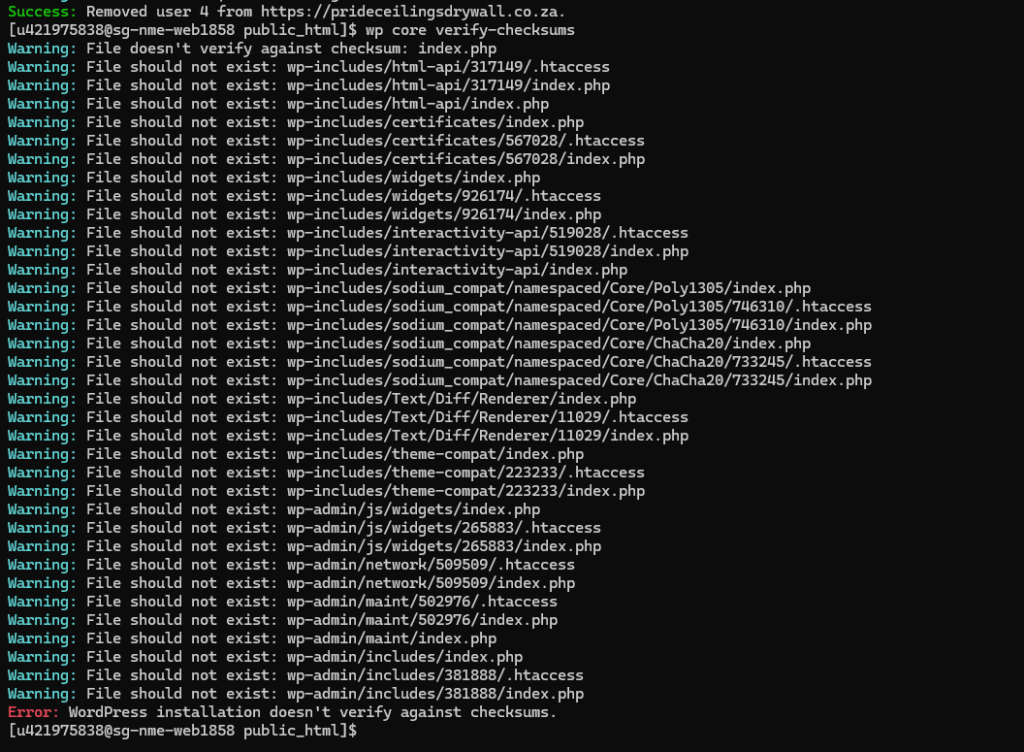
wp-includes, wp-admin, and the root directory. Unknown files had been injected throughout the core file structure. The installation would not verify against checksums at all.
Cleaning the site, the database, and Google
--force flag overwrites all core files with clean copies from the official WordPress repository, while --skip-content leaves themes, plugins, and uploads untouched:
index.php files, unknown .htaccess entries, and fabricated directory structures — were located and deleted from the server root. These were the files responsible for generating the thousands of spam product URLs that had been served to Google’s crawler./items/ path prefix — removing all URLs with that prefix from Google Search for six months, giving the legitimate site time to recover its correct index state.
Locking the site down against re-entry
Cleaning malware without hardening the site is like fixing a broken lock and leaving the key in the door. Attackers often leave backdoors — hidden access points that allow re-entry even after the visible malware is removed. The hardening steps taken here close the primary re-entry vectors: credential reuse, brute-force login, and active sessions from stolen cookies.
What the site looks like after recovery
-
✓Site fully restored: All malware files removed, WordPress core replaced with verified clean files — confirmed by checksum
-
✓Both rogue admin accounts deleted: zetgifari (boss@gmail.com) and Sindie (sindie2465@gmail.com) removed from the user table
-
✓GSC spam URLs removed: Removal request submitted for the entire /items/ prefix — thousands of spam pages blocked from Google Search
-
✓Clean sitemap resubmitted: Google recrawl initiated against the correct 4-page sitemap — legitimate pages reindexed cleanly
-
✓Database cleaned: All transients and post revisions cleared — no residual spam content remaining in any database table
-
✓Security keys reshuffled: All active sessions invalidated — including any the attacker may have still held
-
✓2FA and login limits active: Site hardened against credential attacks and brute-force login attempts going forward
-
✓Total resolution time: under 2 hours from first SSH access to clean site, clean GSC, and full hardening complete
Incident: WordPress site compromise — Japanese keyword SEO spam injection with rogue admin account creation
Detected: Via repeated Google Search Console indexing alerts | Resolved: Under 2 hours
Root cause: Attacker gained admin access (vector unknown — likely compromised credentials or vulnerable plugin), created two rogue administrator accounts, injected malware files into the WordPress core directory, and generated 3,450+ spam product pages under the client’s domain for Japanese search traffic.
Resolution: SSH access via host. Rogue admin accounts removed via WP-CLI. Client password reset. Full backup taken. Core files force-reinstalled and verified. Malware files deleted from root. MySQL database repaired. Security keys reshuffled. GSC spam URL removal requested and clean sitemap resubmitted. 2FA and login limits applied.
Prevention: 2FA enforced on all accounts. Login attempt limits active. Regular security scans recommended. Periodic user list audits advised.
What this incident showcases
Server-level incident response under pressure
This was a live site under active attack with no wp-admin access and thousands of spam pages already in Google’s index. Resolving it required server-level access, forensic diagnosis, and a coordinated response across the file system, the database, and Google Search Console simultaneously. That combination of skills is rare — most WordPress administrators can work in the dashboard. Fewer can operate confidently via SSH and WP-CLI when the dashboard has been taken away from them.
- SSH server access: When wp-admin is locked out, the only path in is at the server level. Knowing how to work there is a hard differentiator.
- WP-CLI forensics: User list inspection, password reset, core checksum verification, salt reshuffling, and database export — all performed from the terminal without dashboard access.
- Malware identification and removal: Using
wp core verify-checksumsto identify injected files, then surgically removing them without touching legitimate content. - GSC incident management: Knowing that cleaning the server is only half the job — the spam URLs already in Google’s index also need to be removed, and the correct sitemap needs to be resubmitted to trigger a clean recrawl.
- Security hardening post-incident: 2FA, login limits, salt reshuffling, and full user audit applied as a standard post-compromise checklist — not an afterthought.