Category: Errors

  • GSC SEO Ranking Malware Highjack

    GSC SEO Ranking Malware Highjack

    Case Study — Hacked Site Recovery | Pride Ceilings | WordPress Portfolio
    Security Incident Malware / SEO Spam / GSC Real Client Incident

    Hacked Site
    Recovery

    Pride Ceilings and Drywall — a live site compromised by a rogue admin, 3,450 spam pages injected into Google, and a full forensic cleanup completed in under two hours.

    Spam Pages Injected 3,450+
    Rogue Admins Found 2 accounts
    Access Method SSH + WP-CLI
    Total Resolution < 2 Hours
    ⚠ Incident Summary

    The client had been receiving repeated emails from Google Search Console warning about pages on his site that weren’t being indexed. His site only has 4 pages — so there should have been nothing to report. When the GSC account was checked, the full picture emerged: the site had been compromised, a rogue admin user had inserted malware, and thousands of Japanese spam product pages had been injected into the site and indexed by Google under the client’s domain. The attack was actively destroying the site’s SEO and could not be resolved through the wp-admin dashboard — which had been locked out by the attacker.

    From a GSC email to a full security breach

    D1
    Client flagged repeated Google Search Console warnings
    The client had been receiving GSC notification emails about pages on his site that were not being indexed. He had contacted me repeatedly about these, not understanding what they meant. A 4-page business website should not be generating indexing errors — this was the first indicator that something was seriously wrong.
    D2
    GSC revealed the true scale of the breach ⚠ 3,450+ injected pages
    Checking the GSC account showed the scope of the attack immediately. A site with 4 legitimate pages had:
    GSC Status Reason Pages
    Not Indexed Crawled — currently not indexed (spam injection) 3,389
    Not Indexed Alternate page with proper canonical tag 28
    Not Indexed Server error (5xx) 25
    Not Indexed Not found (404) 2
    Indexed Legitimate pages + spam pages Google had already indexed 587
    D3
    Google search confirmed the spam injection in full
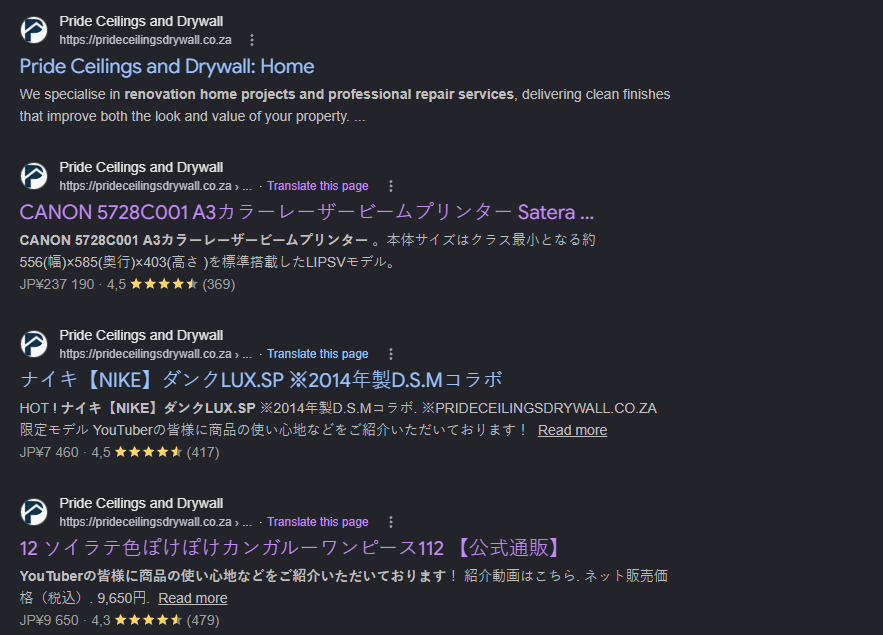
    Running a site:prideceilingsdrywall.co.za search on Google revealed everything. Alongside the 4 legitimate business pages, the results were filled with spam product listings in Japanese — Canon laser printers, Nike trainers, and Japanese retail products — all appearing to be hosted on the client’s domain. Google had already crawled and indexed hundreds of these pages, which was actively poisoning the site’s SEO profile.
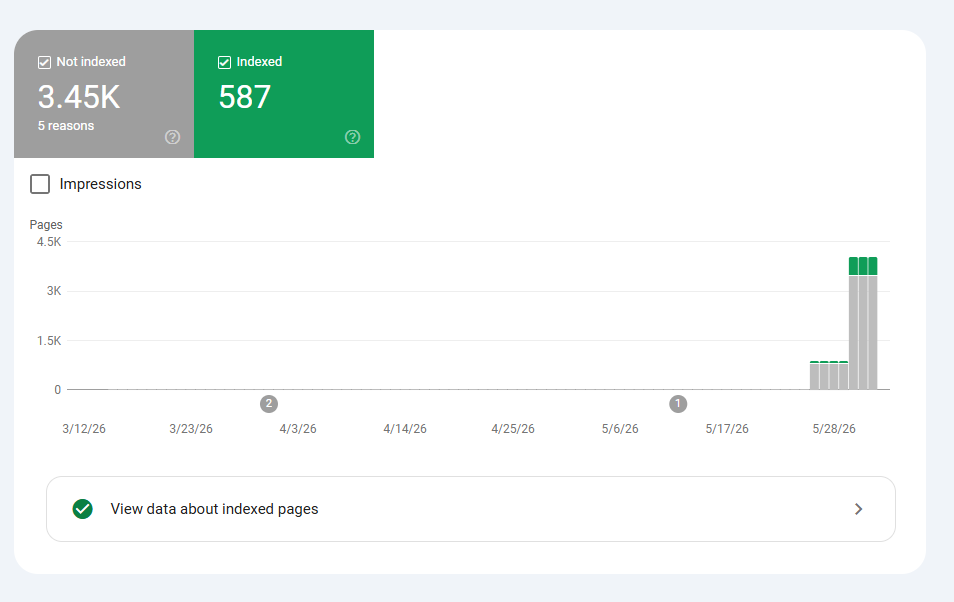
    GSC Indexing Dashboard
    GSC Indexing Dashboard
    3.45K not indexed / 587 indexed — showing the spike in crawled spam pages
    📸 Screenshot — Google Site Search Results
    site:prideceilingsdrywall.co.za showing Japanese spam product pages indexed under the client’s domain
    Google Site Search Results for Japanese Spam
    📸 Screenshot — Google Site Search Results
    site:prideceilingsdrywall.co.za showing Japanese spam product pages indexed under the client’s domain
    ⚠ Why this type of attack is so damaging

    Japanese keyword spam (also called “pharma hack” or “SEO spam injection”) is a specific class of attack where malware silently creates thousands of pages targeting Japanese search queries. These pages get indexed under the victim’s domain, associating their site with spam content. Google responds by either deindexing pages or penalising the site’s overall search rankings — even the legitimate pages. Left unaddressed, this can permanently damage a domain’s reputation with Google.

    Getting in and understanding the damage

    F1
    wp-admin was inaccessible — gained access via SSH from the host
    The attacker had locked the client out of the wp-admin dashboard. With no frontend access, the only path in was at the server level. SSH credentials were obtained directly from the hosting provider, allowing access to the server’s file system and the ability to run WP-CLI commands from the terminal.
    F2
    WP-CLI user list revealed two rogue administrator accounts ⚠
    Running wp user list via the SSH terminal revealed the full user table. The legitimate client account was present — but two additional administrator accounts had been created by the attacker:
    WP-CLI — wp user list (output)
    | ID | user_login | display_name | user_email | roles | 1 | inf@prideceilingsdrywall.co.za | (client) | inf@prideceilingsdrywall.co.za | administrator 3 | Sindie | Sindie | sindie2465@gmail.com | administrator 4 | zetgifari | zetgifari | boss@gmail.com | administrator
    ID 3 (Sindie / sindie2465@gmail.com) and ID 4 (zetgifari / boss@gmail.com) were both unknown. Two rogue admin accounts — the attacker had created a backup account in case one was removed.
    F3
    Rogue admin accounts removed and client’s password reset via WP-CLI
    Both unauthorised administrator accounts were deleted immediately via WP-CLI. The client’s own password was then reset via the command line to restore wp-admin access without needing the compromised login flow:
    WP-CLI — Remove rogue users and restore access
    # Remove both rogue admin accounts wp user delete 3 –reassign=1 wp user delete 4 –reassign=1 # Reset client’s password to regain wp-admin access wp user update 1 –user_pass=”[new-secure-password]”
    F4
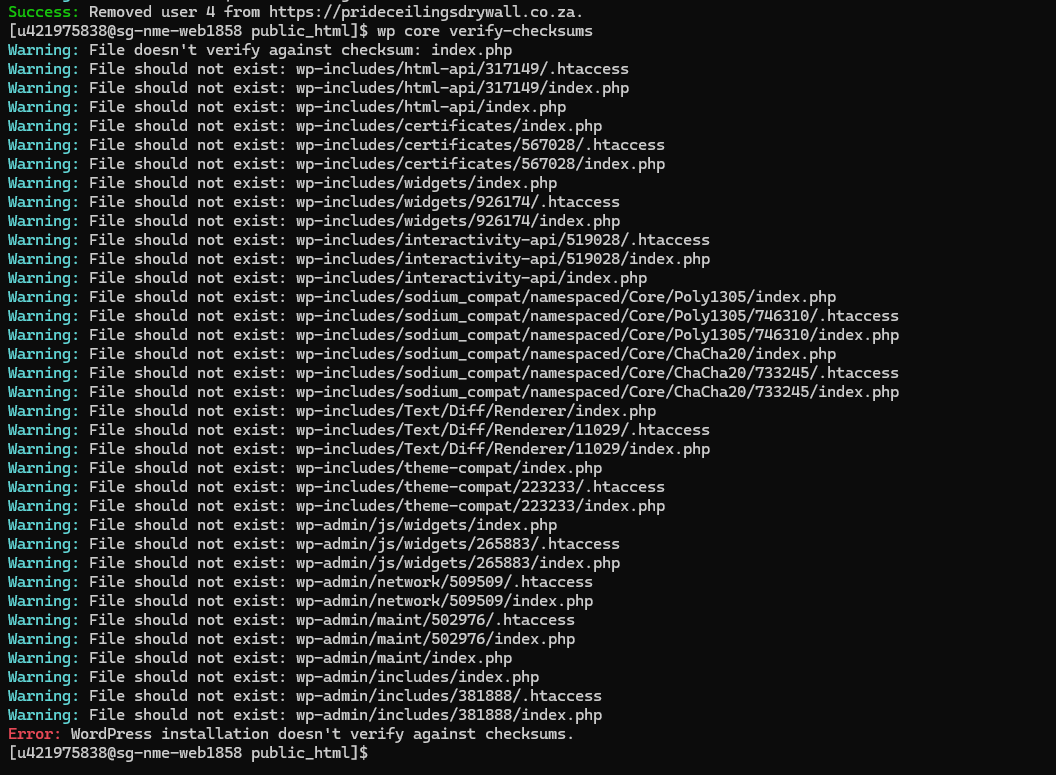
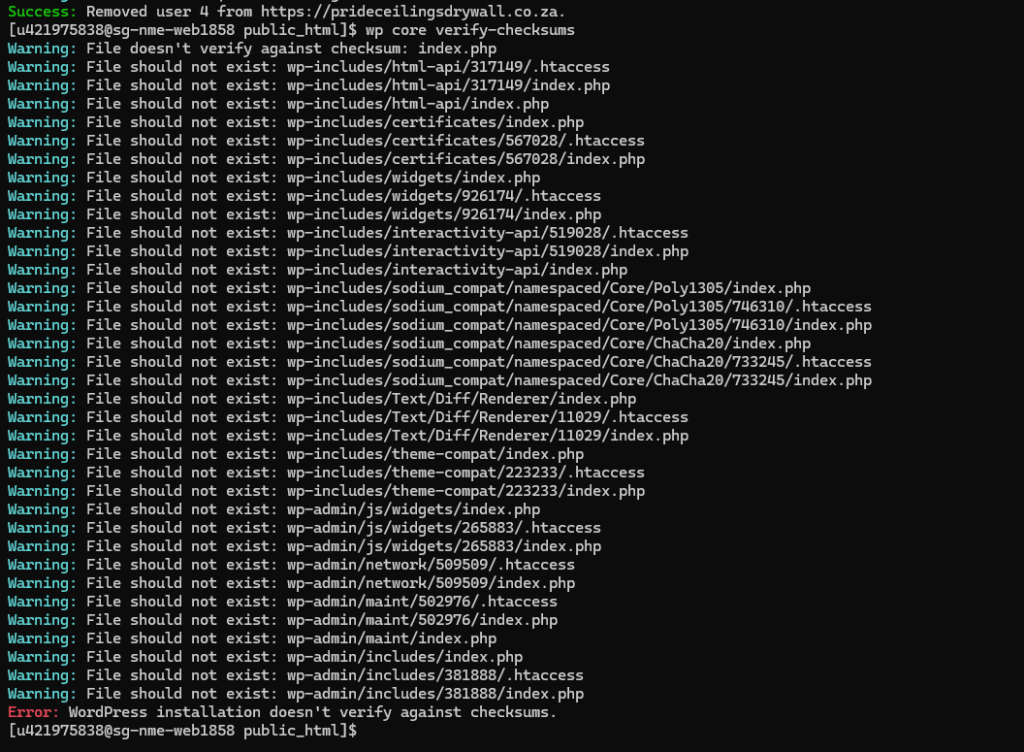
    Core file checksum verification revealed extensive malware ⚠
    Before any cleanup began, a backup was taken — database and all files — then core file integrity was checked:
    WP-CLI — Backup and checksum verification
    # Full backup before touching anything wp db export backup.sql tar -czf backup.tar.gz public_html # Verify WordPress core file integrity wp core verify-checksums
    The output was extensive — dozens of Warning: File should not exist errors across wp-includes, wp-admin, and the root directory. Unknown files had been injected throughout the core file structure. The installation would not verify against checksums at all.
    📸 Screenshot — SSH Terminal / WP-CLI
    wp user list output showing rogue admin accounts, and wp core verify-checksums warning output

    Cleaning the site, the database, and Google

    R1
    WordPress core forcibly re-downloaded and reinstalled ⭐
    With the core files verified as compromised, the only correct response was to replace them entirely. The --force flag overwrites all core files with clean copies from the official WordPress repository, while --skip-content leaves themes, plugins, and uploads untouched:
    WP-CLI — Force reinstall clean core files
    wp core download –force –skip-content # Re-run verification to confirm clean state wp core verify-checksums Success: WordPress installation verifies against checksums.
    R2
    Malware files in the root folder manually deleted
    The injected files identified by the checksum verification — including rogue index.php files, unknown .htaccess entries, and fabricated directory structures — were located and deleted from the server root. These were the files responsible for generating the thousands of spam product URLs that had been served to Google’s crawler.
    R3
    Security keys reshuffled to invalidate any active attacker sessions
    Even with the rogue accounts removed and core files replaced, the attacker may have still held valid session cookies. Reshuffling the WordPress secret keys and salts immediately invalidates all active sessions — including any the attacker might still have open — and forces all users to re-authenticate:
    WP-CLI — Invalidate all sessions
    wp config shuffle-salts Success: Shuffled the salt keys.
    R4
    MySQL database repaired to remove any injected spam links
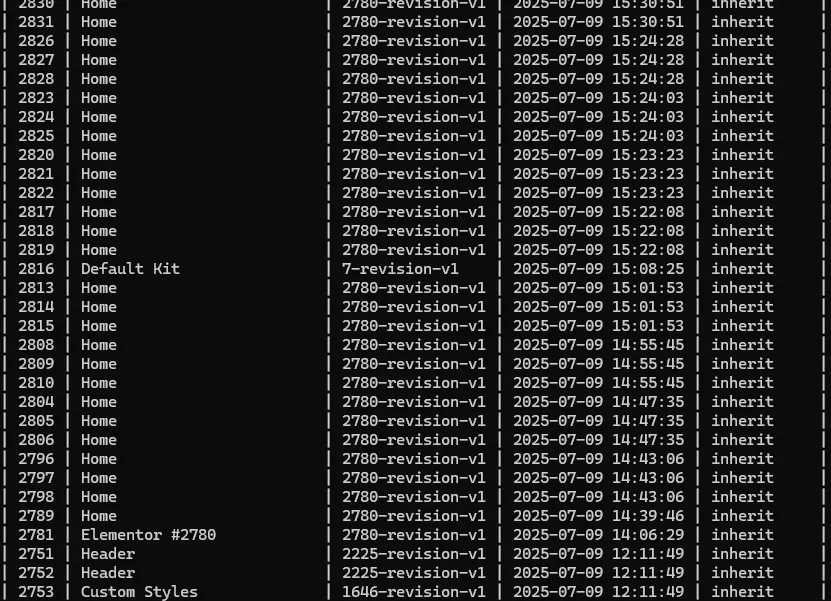
    The database was inspected and repaired to ensure no spam links or malicious redirects had been inserted into the database itself — a common secondary injection point in this type of attack. Database transients (cached query results) and accumulated post revisions were also cleared to ensure no residual spam data remained in the tables.
    R5
    Google Search Console — spam URLs removed and clean sitemap resubmitted ⭐
    Cleaning the server was only half the job. The thousands of spam pages that Google had already crawled and indexed under the client’s domain still existed in Google’s index — and would continue to damage the site’s SEO rankings until they were removed. Two actions were taken in GSC:
    1
    A URL removal request was submitted for the entire /items/ path prefix — removing all URLs with that prefix from Google Search for six months, giving the legitimate site time to recover its correct index state.
    2
    The clean XML sitemap (containing only the 4 legitimate pages) was resubmitted to GSC, signalling to Google exactly what the site should contain and prompting a re-crawl against the clean state.
    📸 Screenshot — GSC URL Removal Request
    Removal request for /items/ prefix and clean sitemap resubmission

    Locking the site down against re-entry

    Hardening 01
    2FA enabled on all accounts
    Two-factor authentication was activated for all WordPress user accounts. Even if credentials are compromised in future, the attacker cannot log in without the second factor.
    Hardening 02
    Login attempts limited
    Brute-force login protection was configured to limit and lock out failed login attempts. This closes the most common vector for credential attacks against WordPress admin accounts.
    Hardening 03
    All passwords changed
    Every user account password was reset to a strong, unique credential. With salts reshuffled and passwords changed, any previously stolen session data or credentials is completely invalidated.
    Hardening 04
    Full security scan performed
    A complete security scan was run post-cleanup to confirm no residual malware, backdoors, or injected files remained anywhere in the installation — themes, plugins, uploads, or root.
    ℹ Why hardening after a hack is non-negotiable

    Cleaning malware without hardening the site is like fixing a broken lock and leaving the key in the door. Attackers often leave backdoors — hidden access points that allow re-entry even after the visible malware is removed. The hardening steps taken here close the primary re-entry vectors: credential reuse, brute-force login, and active sessions from stolen cookies.

    What the site looks like after recovery

    • Site fully restored: All malware files removed, WordPress core replaced with verified clean files — confirmed by checksum
    • Both rogue admin accounts deleted: zetgifari (boss@gmail.com) and Sindie (sindie2465@gmail.com) removed from the user table
    • GSC spam URLs removed: Removal request submitted for the entire /items/ prefix — thousands of spam pages blocked from Google Search
    • Clean sitemap resubmitted: Google recrawl initiated against the correct 4-page sitemap — legitimate pages reindexed cleanly
    • Database cleaned: All transients and post revisions cleared — no residual spam content remaining in any database table
    • Security keys reshuffled: All active sessions invalidated — including any the attacker may have still held
    • 2FA and login limits active: Site hardened against credential attacks and brute-force login attempts going forward
    • Total resolution time: under 2 hours from first SSH access to clean site, clean GSC, and full hardening complete
    📄 Incident Report

    Incident: WordPress site compromise — Japanese keyword SEO spam injection with rogue admin account creation
    Detected: Via repeated Google Search Console indexing alerts  |  Resolved: Under 2 hours
    Root cause: Attacker gained admin access (vector unknown — likely compromised credentials or vulnerable plugin), created two rogue administrator accounts, injected malware files into the WordPress core directory, and generated 3,450+ spam product pages under the client’s domain for Japanese search traffic.
    Resolution: SSH access via host. Rogue admin accounts removed via WP-CLI. Client password reset. Full backup taken. Core files force-reinstalled and verified. Malware files deleted from root. MySQL database repaired. Security keys reshuffled. GSC spam URL removal requested and clean sitemap resubmitted. 2FA and login limits applied.
    Prevention: 2FA enforced on all accounts. Login attempt limits active. Regular security scans recommended. Periodic user list audits advised.

    What this incident showcases

    Server-level incident response under pressure

    This was a live site under active attack with no wp-admin access and thousands of spam pages already in Google’s index. Resolving it required server-level access, forensic diagnosis, and a coordinated response across the file system, the database, and Google Search Console simultaneously. That combination of skills is rare — most WordPress administrators can work in the dashboard. Fewer can operate confidently via SSH and WP-CLI when the dashboard has been taken away from them.

    • SSH server access: When wp-admin is locked out, the only path in is at the server level. Knowing how to work there is a hard differentiator.
    • WP-CLI forensics: User list inspection, password reset, core checksum verification, salt reshuffling, and database export — all performed from the terminal without dashboard access.
    • Malware identification and removal: Using wp core verify-checksums to identify injected files, then surgically removing them without touching legitimate content.
    • GSC incident management: Knowing that cleaning the server is only half the job — the spam URLs already in Google’s index also need to be removed, and the correct sitemap needs to be resubmitted to trigger a clean recrawl.
    • Security hardening post-incident: 2FA, login limits, salt reshuffling, and full user audit applied as a standard post-compromise checklist — not an afterthought.
    WordPress Portfolio — Pride Ceilings Hacked Site Recovery Security Incident  ·  Real Client Case
  • WSOD INCIDENT

    WSOD INCIDENT

    Case Study — White Screen of Death | WordPress Portfolio
    Critical Priority Nulled Plugin / WSOD Real Client Incident

    White Screen
    of Death

    How a nulled plugin brought down a client’s live site at 5am — diagnosed, resolved, and rebuilt within the hour.

    Incident Type Live Site
    Call Time 5:00 AM
    Total Resolution < 1 Hour
    Root Cause Nulled Plugin
    ⚠ Incident Summary

    A business owner called in a panic at 5am — their entire website was completely blank. No error message, no admin access, nothing. This is a textbook White Screen of Death (WSOD): a fatal PHP error that WordPress suppresses, leaving only a blank white page. Investigation revealed the culprit was a nulled (pirated) version of the PRO-Elements Elementor plugin, which had fatally broken the site.

    Why this incident happened

    Factor Risk Level Detail
    Nulled plugin in use Critical PRO-Elements (a nulled Elementor Pro replacement) was installed on a live production site
    No recent backup High Risk No backup was in place prior to the incident, increasing potential for data loss
    Plugins overdue for updates Moderate Several plugins were running outdated versions at the time of the incident
    No staging environment Moderate Updates and plugin changes were being applied directly to the live site

    What we were dealing with

    The site had two problems happening simultaneously, each requiring a different resolution approach.

    Problem A — Immediate
    Complete White Screen of Death
    Both the front end and wp-admin dashboard were completely blank. No error messages, no partial content — the site was totally inaccessible to the client and all visitors.
    Problem B — Secondary
    Plugin dependency on nulled software
    The client’s page layout had been built using the nulled plugin’s features. Simply deactivating it would restore the site but leave sections of the layout broken and missing.
    ⚠ Why nulled plugins are dangerous

    Nulled plugins are pirated copies of premium software with their licence checks stripped out. Beyond the legal risks, they receive no security patches, may contain hidden malware, and can produce exactly this kind of fatal PHP error with zero warning. They are never safe to run on a production site.

    Identifying the root cause

    D1
    Gained server access via FTP
    With wp-admin completely inaccessible, the only route in was at the file system level. FTP’d into the server to access the WordPress installation directly and begin diagnosis without needing the admin dashboard.
    D2
    Enabled WordPress debug mode via wp-config.php
    Opened wp-config.php via FTP and enabled debug logging to capture the suppressed PHP error:
    PHP — wp-config.php
    define( ‘WP_DEBUG’, true ); define( ‘WP_DEBUG_LOG’, true ); // writes errors to /wp-content/debug.log define( ‘WP_DEBUG_DISPLAY’, false ); // keep errors hidden from site visitors
    Refreshed the site to trigger the error and write it to the log file.
    D3
    Checked the debug log — culprit identified
    Opened wp-content/debug.log. The log immediately pointed to the PRO-Elements plugin — a nulled version of a premium Elementor add-on — as the source of the fatal PHP error. The error was being triggered on every page load, causing the full white screen.
    ℹ Debug log is your first tool in any WSOD

    Without the debug log, WSOD gives you nothing to work with. Enabling it is always step one when wp-admin is inaccessible — it tells you exactly which file, which plugin, and which line is responsible.

    Restoring the site, step by step

    R1
    Deactivated the nulled plugin by renaming its folder ⭐ Site restored
    Navigated to wp-content/plugins/ via FTP and renamed the PRO-Elements folder to force WordPress to auto-deactivate it:
    FTP — Folder Rename
    pro-elements → pro-elements-disabled
    WordPress can no longer locate the plugin at its expected path, so it drops it from the active plugins list automatically. Refreshed the site — the white screen was gone and the front end loaded. This is the fastest recovery method when wp-admin is unavailable and is the go-to approach used in production environments with cPanel or FTP access.
    R2
    Logged back into wp-admin and took a full site backup
    With the site restored and wp-admin accessible again, the first action before touching anything else was to take a complete backup using the All-in-One WP Migration plugin. This created a safe recovery point before any further changes were made — a critical step that is often skipped under pressure but should never be.
    R3
    Updated all outdated plugins one by one
    Reviewed the full plugin list in wp-admin and identified several plugins with pending updates. All were minor version updates — no major upgrades were required. Updated them individually rather than all at once, starting with non-critical plugins and working up to higher-priority ones. This approach limits blast radius: if an update causes an issue, you know immediately which plugin was responsible.
    ℹ Plugins updated during this maintenance pass

    Elementor, Forminator, LiteSpeed Cache, PRO Dummy, Site Kit by Google, Wordfence Security, and Yoast SEO were all brought up to date. All updates were minor versions and applied without issue.

    R4
    Created a Hostinger staging environment to rebuild the broken layout
    Deactivating the nulled plugin had resolved the WSOD, but sections of the client’s page layout that relied on that plugin’s features were now missing or broken. Rather than rebuilding directly on the live site, a Hostinger staging environment was spun up to safely reconstruct the affected sections. This protected the live site from any further disruption during the rebuild process.
    R5
    Rebuilt all missing sections to match the original layout exactly ⭐
    Reconstructed every section of the layout that had depended on the nulled plugin, replicating the design precisely using legitimate tools. Once the rebuild was verified against the original design, the staging changes were pushed live. The site was fully restored — visually identical to its pre-incident state — without any reliance on nulled software.
    ✓ Before handover

    Debug mode was turned off in wp-config.php — WP_DEBUG set back to false. Leaving debug mode active in production can expose sensitive server path information to the public. Full end-to-end testing was completed before the site was handed back to the client.

    Recommendations made to the client

    P1
    Remove all nulled plugins and replace with legitimate alternatives
    The client was advised that nulled plugins carry significant risks — including PHP fatal errors exactly like this one, security vulnerabilities, hidden malware, and potential legal exposure. All nulled software on the site was removed and replaced with properly licenced alternatives during this engagement.
    P2
    Set up automatic daily backups to an offsite location
    A recurring backup schedule was configured so that the site is backed up automatically on a daily basis to an offsite destination. A backup transforms a potential catastrophe into a routine recovery. Without one, incidents like this one can mean hours of rebuilding — or permanent data loss.
    P3
    Always use a staging environment for updates and changes
    The client was shown how to use the Hostinger staging environment — the same one used during this incident — to test plugin updates and layout changes before pushing them to the live site. This single habit prevents the vast majority of live-site incidents and means updates can be applied confidently without risking downtime.

    What was delivered

    • WSOD resolved: White screen eliminated within minutes of starting diagnosis via FTP and wp-debug
    • Root cause eliminated: Nulled PRO-Elements plugin permanently removed and replaced with legitimate tooling
    • Full backup taken: Complete site backup secured via All-in-One WP Migration before any maintenance work began
    • All plugins updated: Seven plugins brought up to date one-by-one with no issues — Elementor, Forminator, LiteSpeed Cache, PRO Dummy, Site Kit, Wordfence, and Yoast SEO
    • Layout fully rebuilt: All sections that relied on the nulled plugin were reconstructed on staging and pushed live — visually identical to the original design
    • Full testing completed: End-to-end site test performed before handover to confirm all pages, forms, and functionality were working correctly
    • Client happy: Site fully restored and improved within one hour of the initial call. Client briefed on prevention steps to avoid recurrence
    📄 Incident Report

    Incident: White Screen of Death — nulled plugin fatal PHP error (PRO-Elements)
    Reported: 5:00 AM  |  Resolved: Within 1 hour  |  Total downtime: ~1 hour
    Root cause: A nulled (pirated) version of the PRO-Elements plugin produced a fatal PHP error that WordPress suppressed, rendering both the front end and wp-admin completely inaccessible.
    Resolution: Gained access via FTP. Enabled WP_DEBUG to identify the offending plugin via debug.log. Deactivated PRO-Elements by renaming its folder. Took a full backup. Updated all outdated plugins individually. Created a Hostinger staging environment to rebuild layout sections that depended on the nulled plugin. Pushed rebuilt layout to live. Disabled debug mode and tested fully before handover.
    Prevention: Removed all nulled software. Configured automated daily backups. Client educated on staging workflow for all future updates.

    What this incident showcases

    Key competencies from this resolution

    Resolving a live-site WSOD under pressure — at 5am, with a panicking client — requires a combination of technical depth, calm decision-making, and professional process. This incident demonstrates all three.

    • FTP & file system confidence: With wp-admin completely inaccessible, file system access was the only path in. Knowing where plugins live and how WordPress loads them is non-negotiable for serious site administration.
    • Debug-first methodology: Enabling WP_DEBUG before attempting any fix ensures you are solving the actual problem, not guessing. The log gave an immediate, definitive answer.
    • Backup before touching anything: Securing a full backup before beginning maintenance is a professional discipline — not an afterthought. It protects both the client and the administrator.
    • Staging environment usage: Using a staging environment for the layout rebuild rather than working directly on the live site shows platform maturity and protects the client from further risk.
    • End-to-end ownership: From the initial diagnosis through to the layout rebuild, plugin updates, and final handover test — this was a complete resolution, not just a quick fix.
    WordPress Portfolio — WSOD Case Study Real Client Incident  ·  Critical Priority